Part 1 · The business problem
One PDF a year for 21 years, and no table to download
Part 1 · The data
The same table, printed in three layouts
| County | Sex | 15 | 16 | … |
| Alachua | F | 583 | 959 | … |
| null | M | 572 | 933 | … |
| County | 15 | 16 | … |
| Alachua | … | … | … |
| F | … | … | … |
| M | … | … | … |
| County | Age | Female | Male |
| Alachua County | Age 15 | 612 | 565 |
| Alachua County | Age 16 | 922 | 855 |
SourceFilesQA ReconciliationOne parameter, one source
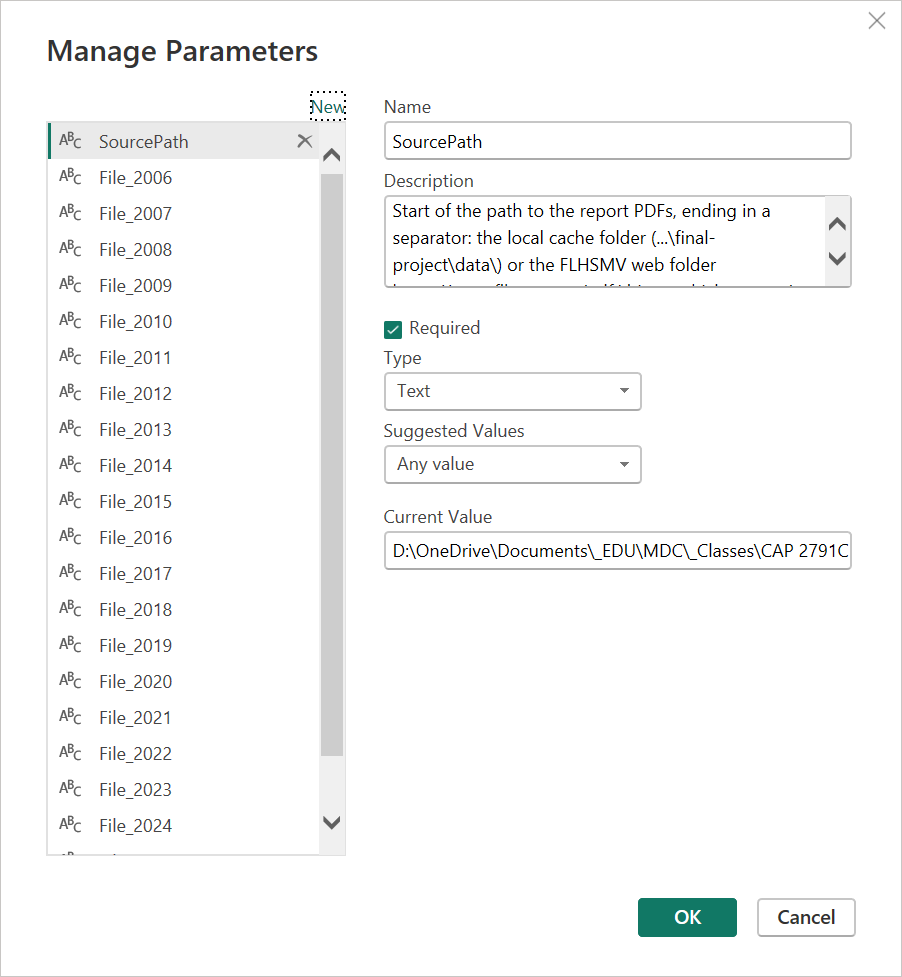
Part 2 · Parameters
Change one value to move the project or switch the source
SourcePath the start of the path to the PDFs...\final-project\data\→ local copies, offline
https://www.flhsmv.gov/pdf/driver-vehiclereports/→ the original source
File_2006countysexage2006.pdfFile_2007countysexage2007.pdf⋮
File_20262026annuallicenseddriverreport.pdf
Part 2 · Staging
SourceFiles turns 22 parameters into one table

SourcePath points at the FLHSMV web folder; Source Location shows where each year was read from.Web.Contents for http, Folder.Files otherwise; no firewall errorsThe long and wide layouts
Part 3 · Long layout, 2019–2026
The long parser is the class ADA query, made general

fnParseLong, on one PDF.Column3 = "Female" and AgeBracket does not contain "to"._ada files. In the wide 2020 and 2021 files, the PDF connector merges the page header into the first row of each page, and that row's numbers are lost.Part 3 · Wide layout, 2006–2011 and 2018
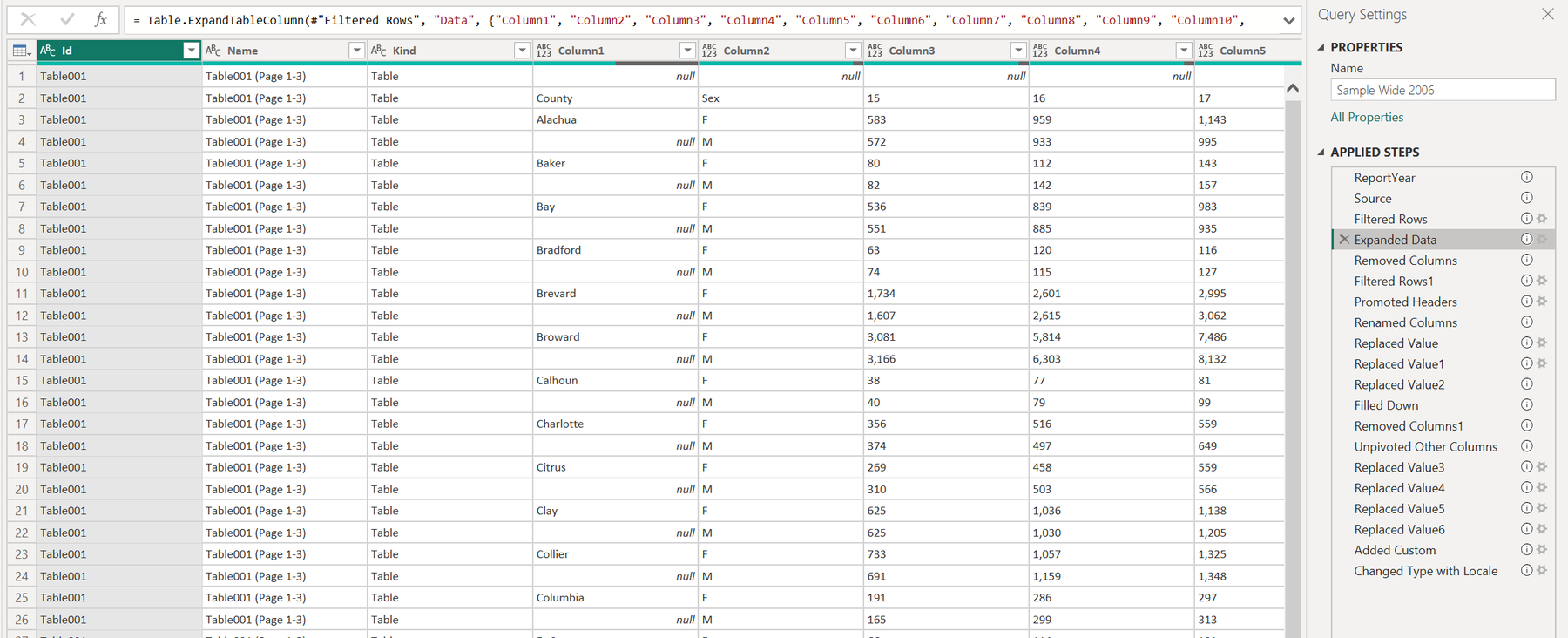
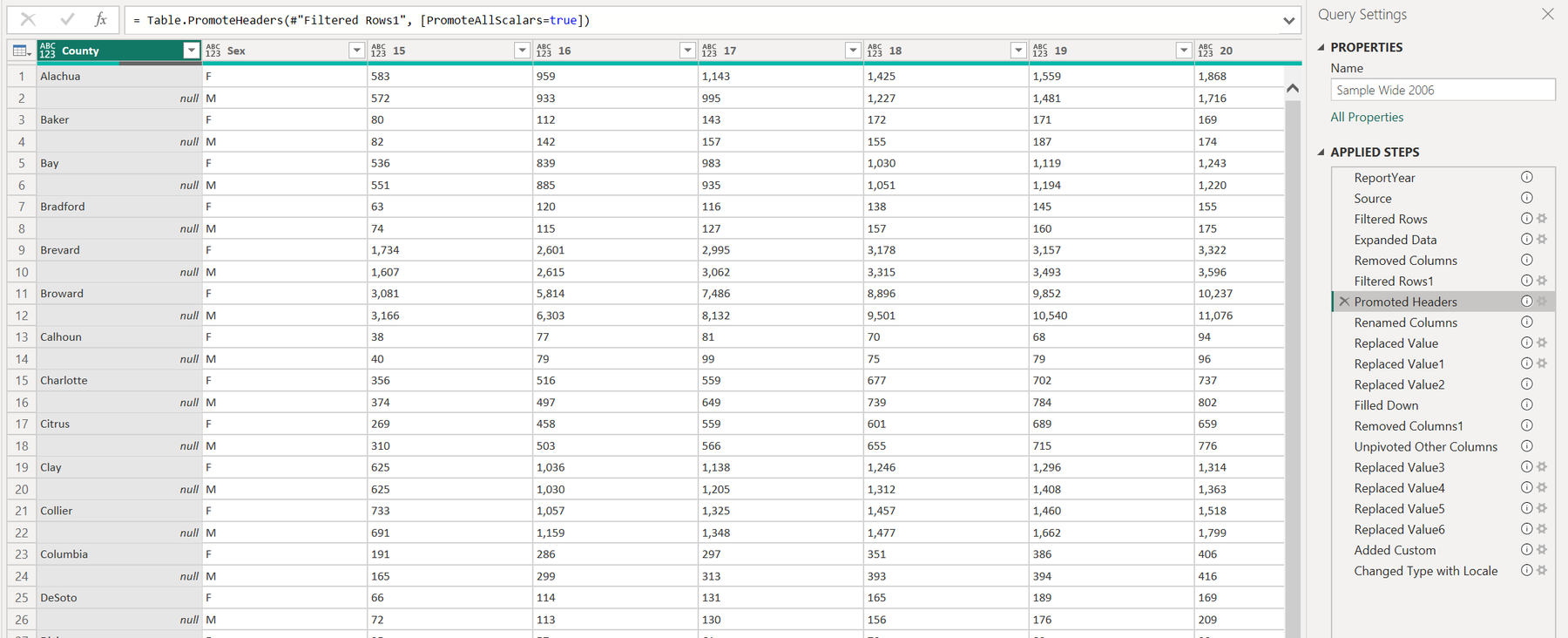
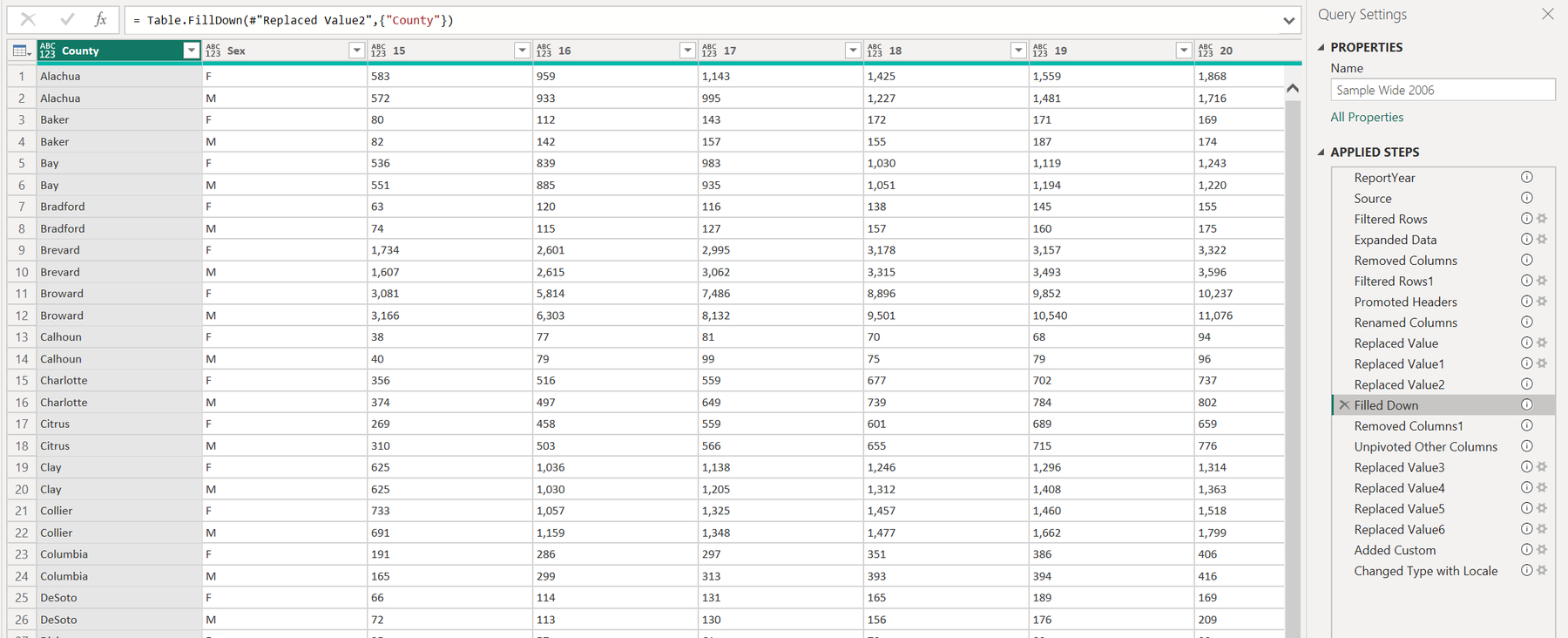
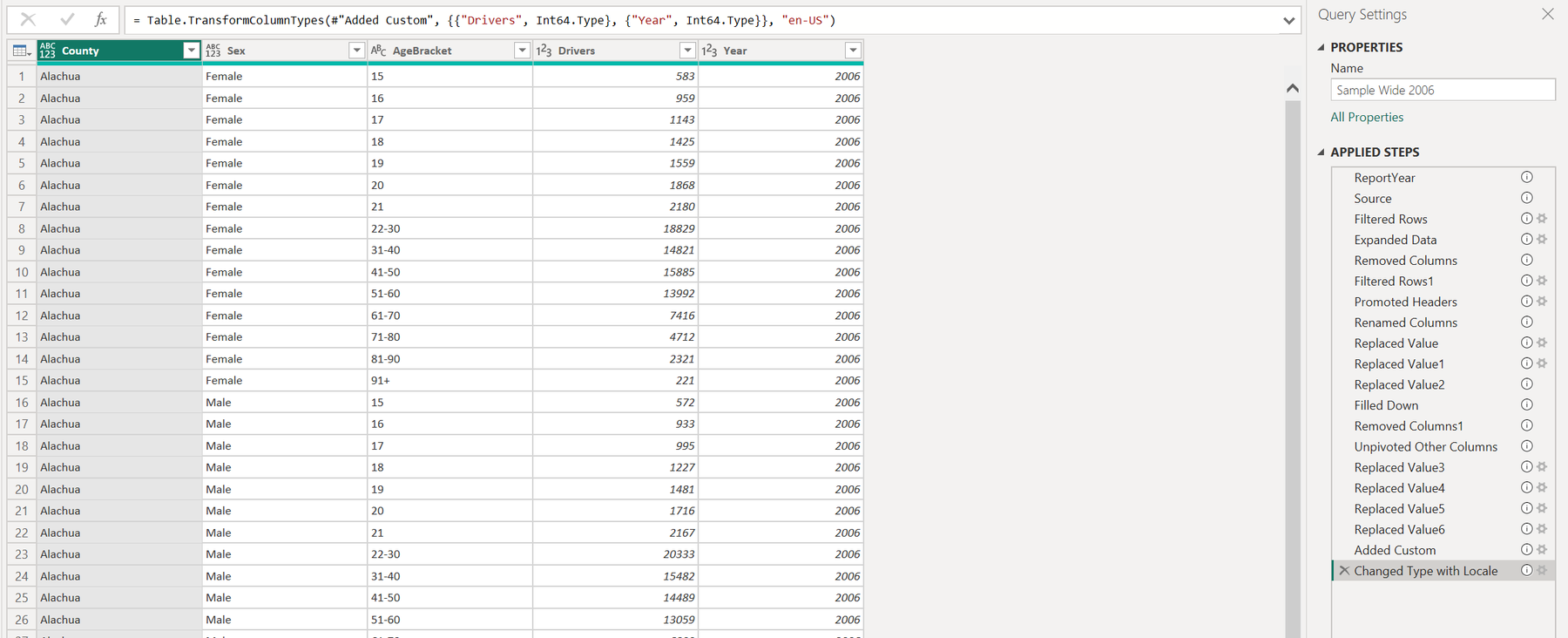
Fill Down and Unpivot turn fifteen age columns into one
The PDF table as Power Query reads it: the county is printed on the F row, with null on the M row.
Remove Empty drops the title; Use First Row as Headers turns the age brackets into column names.
Fill Down copies each county onto its M row.
Unpivot Other Columns, Replace Values (the dash printed for zero, F and M spelled out) and the type change: one row per county, sex and age bracket.
Stacked layout, hand edits, reconciliation
Part 4 · Stacked layout, 2012–2017
A conditional column rebuilds Sex and County

fnParseStackedPart 4 · Hand edits
At most three steps per parser are typed by hand
| Parser | Years | Steps | Typed by hand ("M edit") |
|---|---|---|---|
fnParseLong | 2019–2026 | 14 | the year column |
fnParseWide | 2006–2011, 2018 | 19 | rename by position; label the statewide row; the year column |
fnParseStacked | 2012–2017 | 21 | rename by position; 2012 "21-30" to "22-30"; the year column |

Part 4 · Quality check
All 21 years reconcile to zero

QA Reconciliation in Table view. Check it after every refresh.The model, and adding a year
Part 5 · Star schema
One fact table, three dimensions
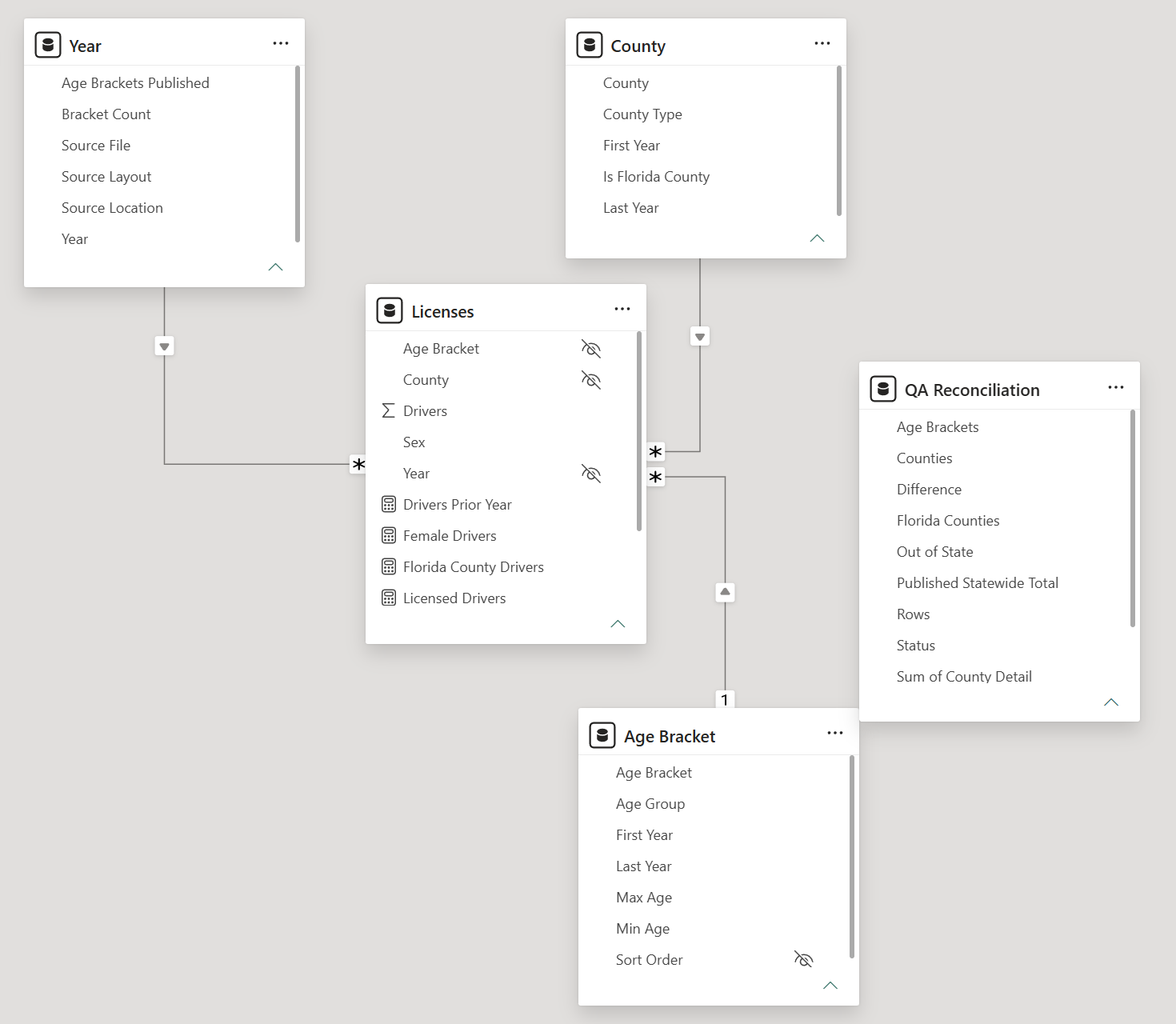
| Table | Role | Rows |
|---|---|---|
| Licenses | fact: year, county, age bracket, sex, drivers | 43,080 |
| Year | dimension, with source file and bracket scheme | 21 |
| County | 67 counties, Out of State, Unknown | 69 |
| Age Bracket | every bracket as published | 28 |
| QA Reconciliation | standalone check | 21 |
Part 5 · Age brackets
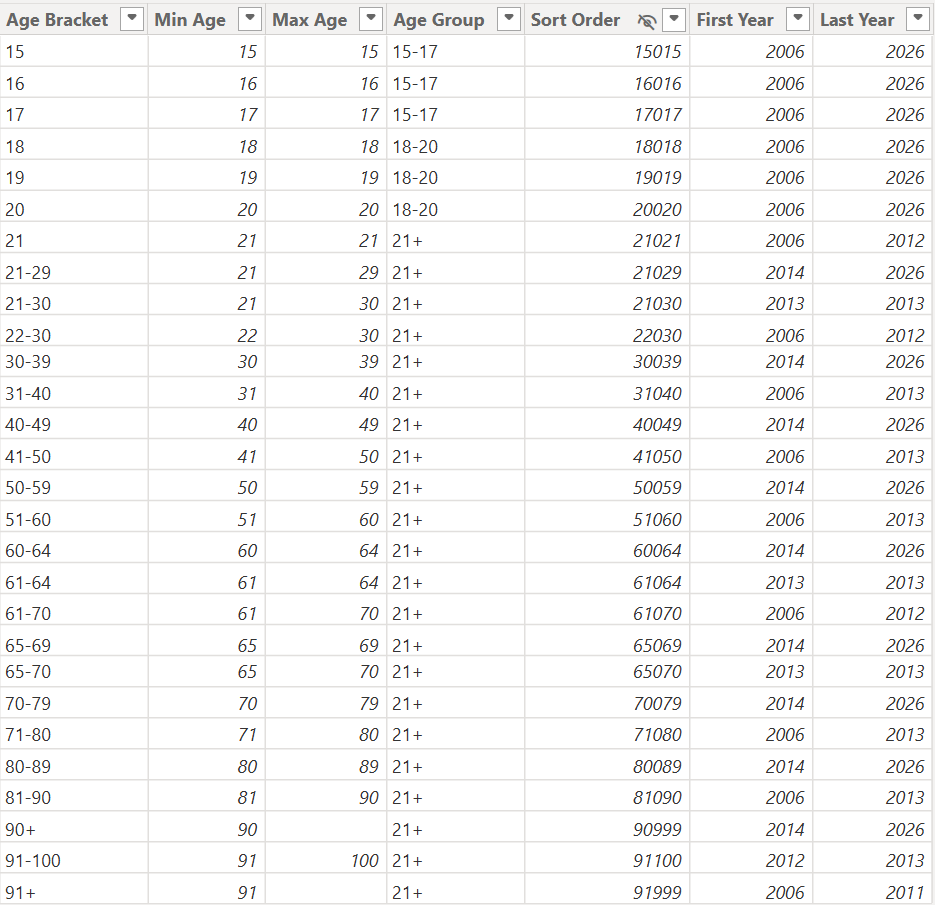
Three bracket schemes; Age Group compares all 21 years
| Years | Brackets above age 20 |
|---|---|
| 2006–2012 | single years to 21, then 22–30 |
| 2013 | 21–30 |
| 2014–2026 | 21–29 |
Above 20 the schemes cannot be mapped onto each other. Every bracket stays as published, and Age Group holds the only groups identical in all years:
Part 5 · Measures
Each report is a snapshot: Licensed Drivers takes the latest year
Licensed Drivers =
VAR LatestYear = MAX ( 'Year'[Year] )
RETURN
    CALCULATE ( SUM ( Licenses[Drivers] ), 'Year'[Year] = LatestYear )

Florida County Drivers =
CALCULATE ( [Licensed Drivers], 'County'[Is Florida County] = TRUE () )
Seven measures in two display folders: Drivers (Licensed, Female, Male, Florida County) and Change (Prior Year, YoY Change, YoY Change %).
Part 5 · Maintenance
Adding 2027 takes four steps
- Save the 2027 PDF into
data\under the file name FLHSMV publishes - Add
File_2027to Parameters - File NamesManage Parameters, New, type Text - Add one row to
SourceFiles{2027, File_2027, "Long"}, or "Wide" or "Stacked" if the layout changes again - Refresh and open
QA Reconciliation2027 should read Reconciled with 68 counties; new county spellings go intoCountyAliases
Conclusion
What you are taking over
- 1One value to change.
SourcePathswitches between the local copies and the FLHSMV website. - 2Three parsers from ribbon steps. Each has a Walkthrough sample to click through, with at most three hand edits.
- 3A check after every refresh. All 21 years reconcile to the statewide total printed in each PDF.
- 4A star schema. Snapshot measures, and an Age Group that compares across all years.
- 5A new year in four steps. One PDF, one parameter, one row, one check.
Thank you. Questions?